QBD SOFTWARE / LINUX DESKTOP / DEVELOPMENT PREVIEW
NEXUS.
Your projects. Your tools. Your assistant.
An AI workspace built around conversations, local knowledge and practical computer tasks—with voice interaction, remembered preferences and a visible view of its activity.
01 / THE EVERYDAY WORKSPACE
A conversation with context.
NEXUS brings saved conversations, project files, notes and supported tools into a native Linux desktop application. Ask a question, work through an issue, explore a document or request a supported action without moving between separate AI interfaces for each step.
Local Ollama models provide an on-device option. An explicitly configured online provider offers another path, subject to its account and access requirements. Model choice matters: response quality, speed and context capacity depend on the model and the available hardware. The interface shows the selected provider and tracks reported lifetime token usage; unreported or historical usage is not reconstructed.
NEXUS currently runs independently from QBD Integrated Workflow. Workflow retains ArtCraft, Sheets Lab, Revisio Finance and Dev Center. Keeping the applications separate preserves clear service ownership while future integration remains a deliberate development choice.
02 / WHAT YOU CAN WORK WITH
One assistant, several ways to work.
Talk or type
Use text chat, microphone input, spoken answers and the configured conversation controls.
Ask your documents
Retrieve project passages, search equipment identifiers and inspect page references and index coverage.
Use practical tools
Launch supported apps, inspect files and use connected desktop tools when their access is active.
Build project knowledge
Review source, follow code relationships and retain concise lessons for later conversations.
03 / VOICE INTERACTION
Speak naturally. Stay in control.
The voice workspace combines microphone capture, speech recognition and spoken output. The current conversation configuration waits for approximately two seconds of silence before processing a spoken turn. Voice startup, speech interruption and stop-voice commands are part of the interaction design, alongside visible microphone and playback controls.
The desktop can also use a compact companion window. Recognition and interruption depend on the microphone, background noise, playback echo and the selected voice runtime. Those controls should not be read as a guarantee of perfect recognition or instant interruption in every environment; a spoken stop command is not a substitute for a dedicated emergency-stop control.
04 / TOOLS ON YOUR COMPUTER
From an answer to an action.
Supported local tools can find and read files, launch applications and handle specific workspace tasks. When a desktop-control connection is active, NEXUS can use screenshots, pointer and keyboard tools to interact with applications. Screen visibility and input control are separate capabilities: a model saying it has access is not evidence that the connection is working.
Desktop permissions, session state and emergency-stop controls remain authoritative. Website interaction also depends on the target site, account access and any human verification it requires. NEXUS does not gain unrestricted access simply by changing a role.
Blender integration adds a practical creation path: bounded scene descriptions can produce geometry through supported primitives and mesh operations. It is a developing modelling tool, not a promise of professional-quality results for every arbitrary design. Saved outputs and previews provide something concrete to inspect.
05 / PROJECT DOCUMENTS AND OCR
Answers grounded in project material.
Project indexing makes supported documents searchable and supplies relevant passages to the conversation. Local OCR extends that workflow to supported scanned pages and images. Equipment-code matching, page references and visible extraction coverage help distinguish useful evidence from a general model answer.
Original documents are retained, and reindexing can refresh searchable content. Existing indexes may need rebuilding to benefit from newer extraction behaviour. OCR can misread text, and a retrieved passage is not proof that every page has been inspected. NEXUS exposes incomplete coverage rather than treating missing search results as evidence that information does not exist.
06 / MEMORY AND LEARNING
Remember the useful parts.
NEXUS can learn supported explicit preferences and keep concise lessons in a shared, Obsidian-compatible local memory. Those notes can carry project decisions, useful conventions and earlier findings into later work. Preferences can be reviewed and changed; recent work repaired handling of requests not to address the user by name.
This is retrieval-based learning. Saving a lesson does not retrain the model or create new model neurons. Notes are reference material, not permission to perform unrelated actions. Useful memory needs attribution, current verification and a clear distinction between a tested result and an unconfirmed model claim.
07 / CODE REVIEW AND AGENT TASKS
Choose the task. Let Auto choose a focus.
Auto is now the default agent role. Local intent rules suggest up to three initial specialties—such as debugging, testing and coding—and the model is instructed to adapt its approach to the actual request. Manual roles remain available for focused work, including architecture, review, security, research and scheduling.
Roles guide the approach; task mode determines what can actually happen. Text mode provides analysis or a proposed solution. The separate isolated Python coding mode supports bounded coding experiments and tests. Selecting Evolution does not authorize self-modification or deployment, and selecting Scheduler does not itself create recurring jobs.
The October 26 development update adds revisioned Python and JavaScript builds with isolated tests, reviewed Aurora Blender scene helpers, and an opt-in Self-improvement practice queue. Practice saves experiments for independent review; it does not autonomously deploy software or retrain the active model.
A separate local Unsloth pilot improved from 8 to 11 passes on 12 synthetic held-out checks, but introduced one arithmetic/tool-selection regression. Its adapter remains inactive. These narrow results do not establish general intelligence or reliable task completion.
For source work, NEXUS can discover local QBD repositories, locate files and use Graphify relationships to navigate a project. REA contributes static JavaScript/Electron evidence, while direct source inspection supplies the details needed to assess a finding. Native decompiler engines are not configured in the current setup.
Independent review and comparison are part of the process. NEXUS has read an independently tested review and saved lessons from it, but several earlier review attempts merely repeated source text. That distinction matters: available tools and saved notes do not establish a completed audit. Code changes still need relevant tests and evidence.
08 / THE NEURAL ATLAS AND ACTIVITY VIEW
A visible companion to the work.
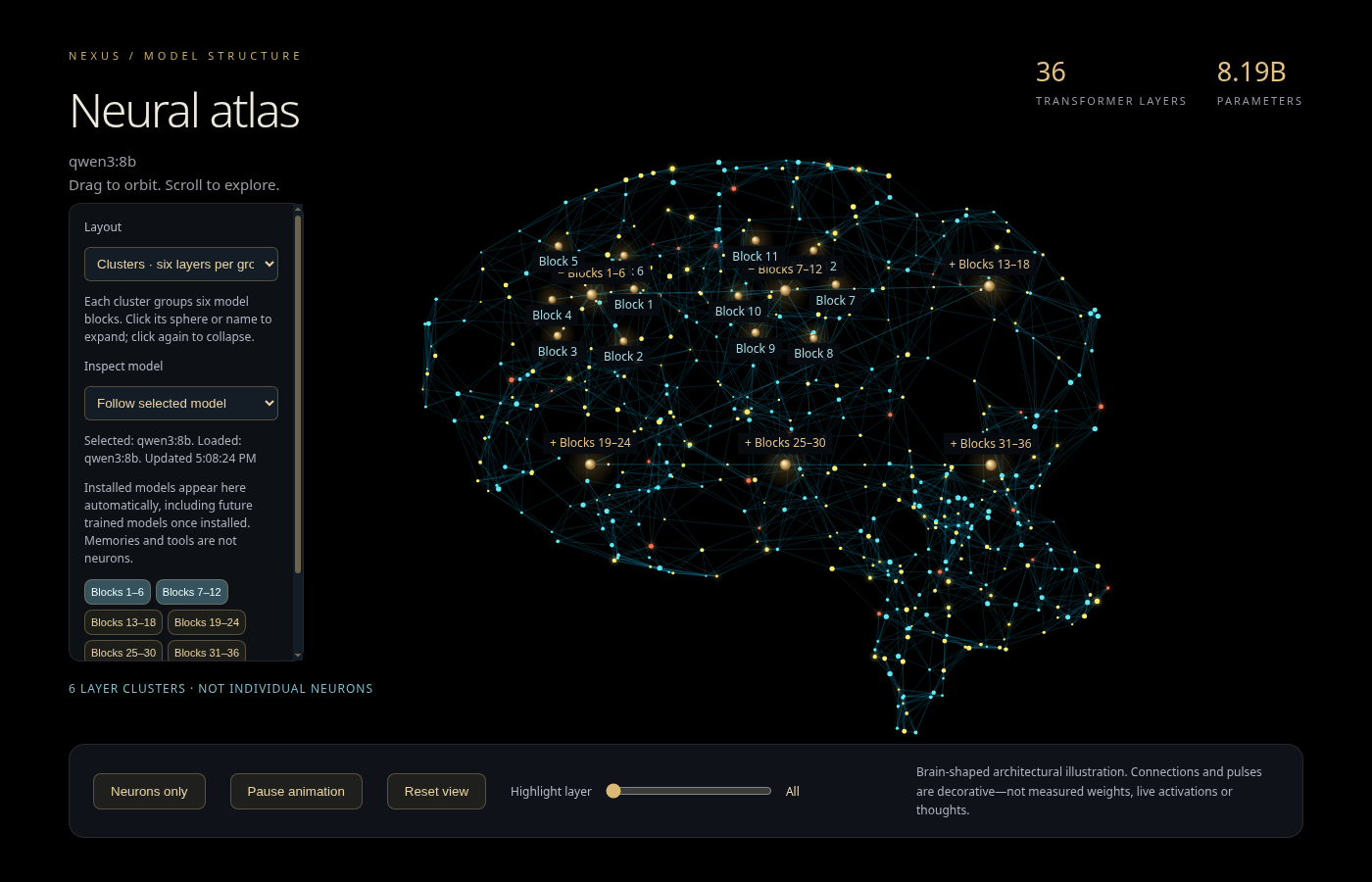
The neural atlas presents available local-model metadata in a brain-shaped visualization. Expand a model-layer cluster to inspect its contents, collapse it again, or switch to a minimal view. Installed-model discovery helps the view follow the local model collection.
A smaller brain stays in the main sidebar. Glowing pulses move along its connections while NEXUS answers, speaks or performs background generation, and it settles when idle. Drag the sidebar divider to enlarge it; the canvas scales with the available space and remembers the chosen width. Reduced-motion preferences are respected.
The distinction is simple: application activity drives the display, while the network animation is decorative. It is not a live recording of model weights, individual neurons, consciousness or newly trained network structure.
09 / EVIDENCE AND REMAINING WORK
A development preview, with visible limits.
Recent checks covered Auto role routing and default selection, sidebar dragging and persistence, shared-memory reads, and a targeted name-address preference repair. Real chat requests verified the latter in both reply text and text prepared for speech. This is focused testing, not certification of every capability.
- The latest live agent-task attempt selected appropriate roles but was blocked by the conservative model-memory guard. Correct routing is not the same as completed inference.
- Long tool exchanges can exceed the intended history budget. Context management and code-review reliability remain areas for improvement.
- Voice interruption, screen control and remote phone access depend on their runtime, permissions and connection setup; this update does not claim universal reliability.
- OCR, modelling and model-generated findings require inspection. Saved lessons are not independently verified unless their evidence supports that label.
Development updates preserve existing chats, documents, preferences, models and voices. Private project evidence, credentials and local user records are not part of this public article.
Follow NEXUS as it develops.
NEXUS is being built as a practical assistant that can connect conversation with project knowledge and supported actions. The next improvements are judged by what can be reproduced and verified—not by a promising label or a striking visualization.
Read the combined development history →Enquire about NEXUS →